

How To Get Out Of Safe Mode Windows 7 Command Prompt
This guide is for users who forgot the administrator password in Windows 7 for some reasons, I volition bear witness you how to bypass Windows seven countersign using Command Prompt without the need to format and restore the organisation.
Method 1. Featherbed Windows 7 Password Using Command Prompt in Safety Mode
If you locked out of Windows 7, you tin featherbed Windows 7 password using Command Prompt in condom mode. Now follow the step-past-step guide beneath to find ambassador countersign Windows seven using Command Prompt.
Step 1. Turn off your Windows seven PC completely. Plow information technology on once more and press the F8 key. You must do it before the Windows logo appears, while the BIOS messages are displayed. If you take not given time to expect for Windows to load completely, turn off and effort again.
Stride 2. When everything goes well yous will see a list of options in white letters and blackness background. It is the menu of advanced Windows kicking options. There are three possibilities:
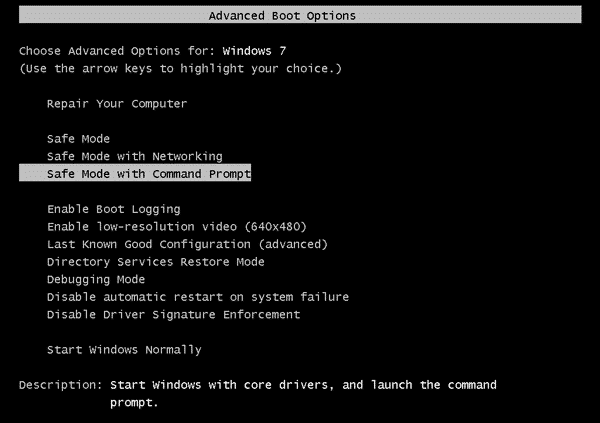
- Condom Fashion. Start Windows with the minimum necessary.
- Safe Mode with networking. Information technology also loads the components that allow access to the Internet or a network.
- Safety Mode with Control Prompt. Open the MS-Dos panel. It is a very powerful tool when you know the commands that you utilise in information technology.
To reset Windows 7 countersign using command prompt, you lot should choose Rubber Mode with Command Prompt and press Enter.
Step 3. So the Command Prompt window shows up, blazon the cyberspace user command below to unlock Windows 7 countersign.
net user username password
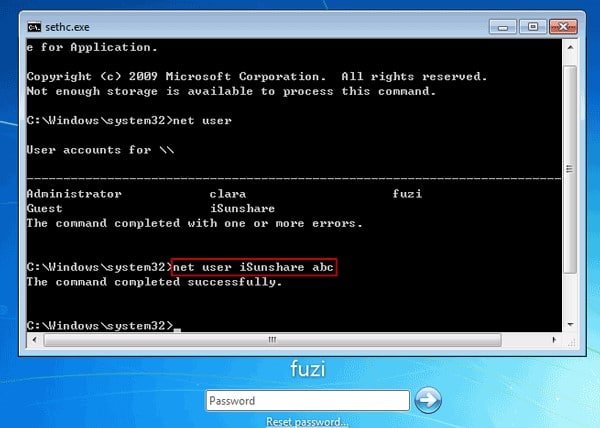
Note: Supplant username with your Windows 7 account proper name, and password with your new password. If you don't know the username, type internet user showtime to browse all the user in this Windows vii estimator.
Now you tin restart your Windows 7 normally and log in with the new created password.
Method ii. Bypass Windows 7 Password Using Control Prompt with Installation Deejay
If you want to bypass Windows 7 countersign using command prompt but have some problems on how to boot Windows in safe way, you however tin can use a Windows 7 installation disk to crack Windows 7 password with command prompt. The premise is that you must have a disk, if non, recommend y'all can try Windows Password Recovery Tool to assistance y'all which is the easiest mode to notice Windows 7 password.
Step ane. The beginning thing is to insert Windows 7 installation deejay or flash drive in the locked calculator. Then boot your computer from the installation disk.
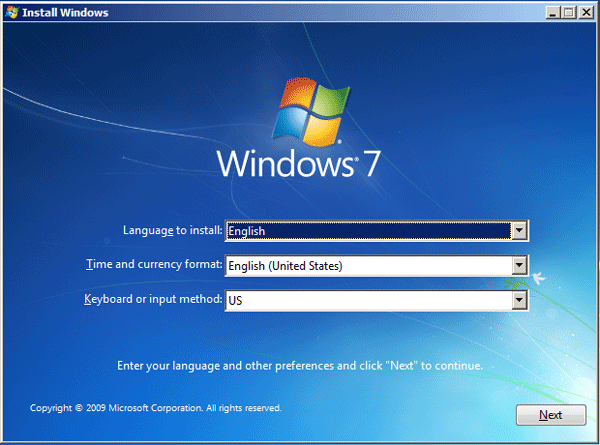
Step two. Choose your linguistic communication, click Next, then information technology shows u.s. the following options:
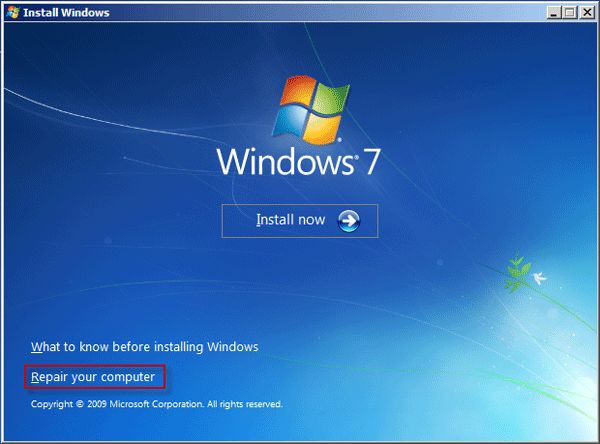
- Install Now
- What to know earlier installing Windows
- Repair your calculator
Cull Repair your computer.
Stride 3. We will see the Arrangement Recovery Options, which shows us different options, choose the first one. Find out what letter is your CD-DVD optical drive. Examples: D: and if you give them error effort another alphabetic character of device, most times D:.
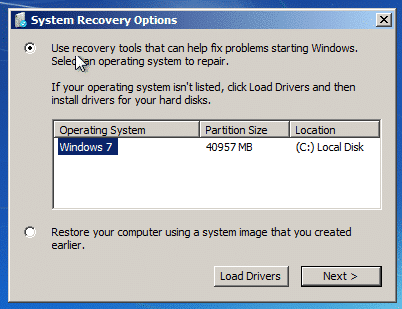
Step 4. Cull Command Prompt on the next screen. Now the Control Prompt window opens. Blazon the command below and press Enter to copy a utilman.exe:
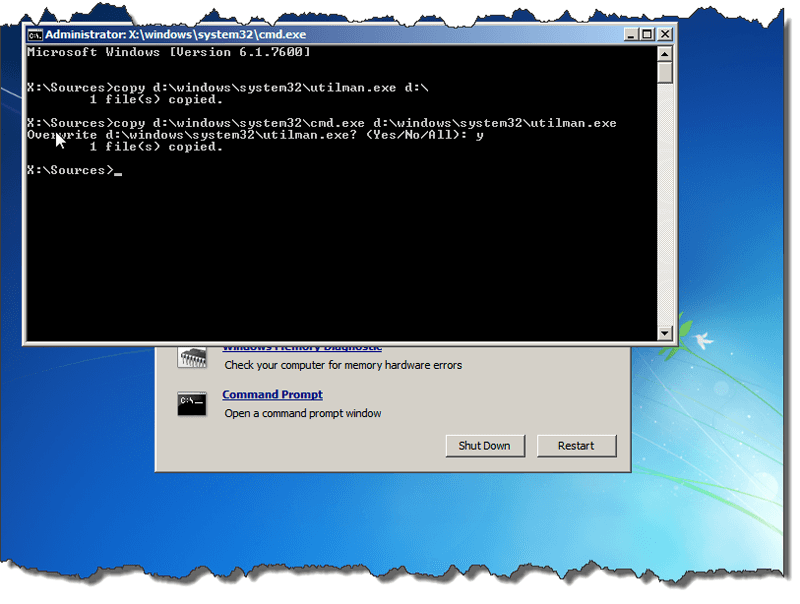
copy d:\windows\system32\utilman.exe d:\
Then type the command below and press Enter to copy a cmd.exe the overwrite the ultilman.exe:
copy d:\windows\system32\cmd.exe d:\windows\system32\utilman.exe
Now yous are presented with a question:
Overwrite d:\windows\system32\utilman.exe? (Yep/No/All):
What you need to do is type Y or Yes and press Enter.
Pace 5. Remove the Windows vii installation disk, close the Control Prompt and restart your computer. Then the Windows vii logon screen shows upwards. Click the Ease of Access button on the bottom-left of the screen.
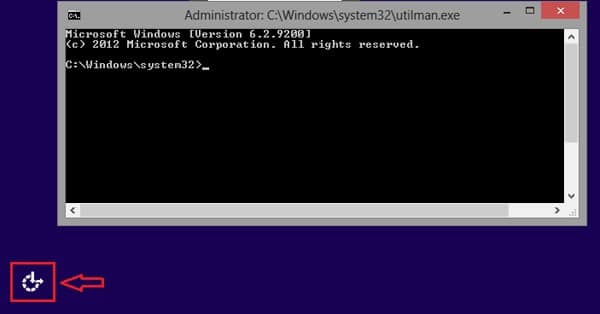
Step 6. Now the Command Prompt shows up again, blazon the command below to bypass Windows 7 password.
net user username password
Note: Replace username with your Windows 7 account name, and password with your new password
Step seven. Finally, close the Control Prompt window and blazon in the new password on the countersign field, press Enter and so you lot can log into your Windows 7 system.
With these simple steps we have been able to hack ambassador password in Windows seven using CMD.
Free Download Buy Now
How To Get Out Of Safe Mode Windows 7 Command Prompt,
Source: https://www.winpasskey.com/how-to-bypass-windows-7-password-using-command-prompt/
Posted by: martindomay1994.blogspot.com
0 Response to "How To Get Out Of Safe Mode Windows 7 Command Prompt"
Post a Comment